

Match Search Singapore


Match.com's Search Function

- Helps you find the right match for you
- Free of cost and time-saving
- Multiple types of searches
- Several built-in features
- Privacy in match search
Match.com operates as a significant and foundational dating site where single individuals can meet other singles who long for love. Their desire for love is so strong that they proactively seek it out.
On Match.com, participants can establish their profiles to depict themselves and how they wish to be seen by potential matches. The specifics you incorporate into your profile are tapped by the website to assist in finding individuals with whom you might want to go out. The site’s search mechanism, powered by an algorithm, uses your profile along with other users' profiles to match you with someone special.
Importance of Search functions in dating apps

Providing a search function is an important function on any dating sites. This allows users to have a way to find content within the site. This means that Match.com’s users can look for other users by searching for specific types or preferences for a match of a possible serious love affair.
For a free site like Match.com, putting in applications within their search function is a big deal. It truly helps their users to navigate the site without all the trouble of combing through its every bit and pieces. Furthermore, these built-in and specific search features allow you to narrow down your search, making it easy and less complicated.
It’s All About the Search
The search function is there so that you can be able to explore the site without having to spend so much time trying to understand what the site has to offer. It is an easy and faster way for users like you to find what you’re looking for in one go especially for large sites like Match.com.
Where to find the Search Button
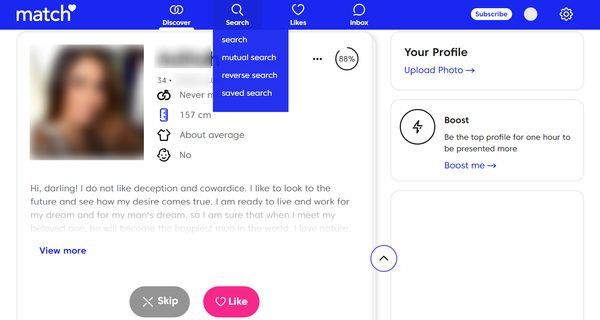
You won’t miss it! Match.com does not want you to have a hard time looking for that Search function. Once you log-in on the site, it’s there already—in the menu bar, right in the centre of the top screen.
The Search feature has earned its place and embedded in the menu bar where you can see it easily. So even if you jump from one page to the next, you can still find it as long as you’re still within Match.com.
Search Features
Clicking on it, you will see that it has several Match.com's different search options that you can use such as:
- Search
The regular search function that allows you to look for a match using the basic criteria such as gender, location, and age.
- Mutual Search
This is based on your mutual preferences like traits and interests, etc. The profile results of the mutual search can also be sorted based on your preferences. Profiles displayed in your mutual search tabs are also based on your profile information.
- Reverse Search
Match.com’s reverse search feature displays profiles of users who are looking for someone like you based on their preference.
- Saved Search
Whenever you run a search with added filters and preferences, you have the option to save it and re-run it at some other time.
- Username Search
At Match.com, you are able to search its members’ database through a username search. It allows you to search for members using their Match.com usernames. Simply go to the search link, and enter the username of the member that you’re looking for.
How They’re Used
When searching for someone, chances are you already have an idea on about who you want to meet. This is where Match.com’s search algorithm comes in.
For starters, they have built-in filters that you can use to narrow your search. Some of these are: those what you’re seeking for, the age range, location radius, and some even include exact locations. Your search choices and options can be saved but your search results can also be sent through email.
In short, to make it easy for you, Match.com made sure that you don’t have to look any further because they got you covered.
Match.com’s Built in Search Features
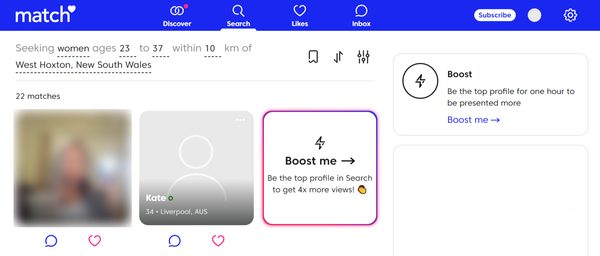
To help you narrow down your search results even further, Match.com has put in filters that allow you to find your ideal type in one go.
Through the sort search, this allows you to pick and view your search results on how you wanted them displayed. This includes:
Top Picks
These are profile suggestions that follow the preferences you indicated in your profile. Top picks also reflect those members you recently liked or sent messages to.
Activity Date
Shows you the last activity date of each match, their communication with another member, or the last time they checked their matches.
Newest First
This option displays all Match.com users who joined the site starting from the most recent members to the least recent.
Age
You can sort your Match search results base on age—from youngest to lowest or vice versa.
Photo Count
Match profiles are sorted based on the number of photos they uploaded on the site starting from those with the most photos uploaded to their account.
You can also opt to check the box next to Photos only on the search form after you input your search criteria. The results will only show those members who fit your criteria and those who have photos in their profile.
Distance
Sorts based on the distance between you and your potential match based on your zip code or city. In other words, this determines how far away you live from each other.
Other than the listed above, you can also sort members through mutual search and reverse search.
Other search filters

Having search filters is essential to that you will be able to narrow down the criteria of your perfect match. The narrower the search criteria is, the more closer your matches are to your preferences. However, you should also expect that narrow preferences mean lesser potential matches.
If you’re taking that risk of a low number of potential matches, here are some of the search filters available in Match.com are:
- Shortcuts
You can use Match.com’s shortcuts filters where you will be able to set criteria on other members’ visibility and last online activities.
- Interests
The site has also added an interests filters so that you can indicate your preferences of potential matches’ based on their hobbies and interests.
- Looks or Physical Appearance
Physical appearance is also important that’s why Match.com provide looks filters for your preferred body type and eye and hair colour.
- Personal or Background Information
You may also specify if there are any personal backgrounds that you like for your potential match to be. You can use the personal filters to set criteria for their marital status, ethnicity, educational attainment, and languages they speak.
- Lifestyle Habits
Lastly, you would want your partner to have the same lifestyle as you, so the lifestyle filter is your friend. You can filter out people based on their habits such as smoking, drinking, and exercise.
You also have the option to save your search preferences to your profile or sent through your email for back up.
Other Ways to Search at Match.com
In its effort to make Match.com easy to navigate, it has put in place several ways to make its members easy to find. The different search options also help increase their chances of finding a Match. However, the site has also included precautionary measures to protect its users’ data and personal life.
Privacy and Location Searching

Despite the number of Search options that Match.com, it has also included a feature that aims to protect your privacy regardless if you access it through your desktop or your mobile phone. With its privacy and location search features, you can be sure that your exact location is not shared nor made available to other members of the site.
When Your Profile is Hidden
If you choose to hide your profile, it will not be displayed on other members’ Who’s Favourited Me unless you unhide your profile. But you will still be able to add members to your Favourite’s list and Match.com will register that you have favourited them. Again, your profile will not appear on their list, but it will be once you unhide it.
Appearing with a Different Username
Any Match.com member has the option to change their username any time they wish. However, if you do change your username, you have to know that you will still appear on other users’ favourite list and your new username will reflect on their list.
Quick and Easy Matching with Search
Match.com’s Search enables you to find members who meet your specific preferences. Taking matters into your own hands was made easy with their quick search function and a whole lot of other options. All you need to do is specify your type, set your matching options and keywords, and click search. Voila! You get your search results without going through every member’s profile on the site.
With the search functions, your long wait is over. So what are you waiting for? Sign-up for a Match.com account now!
